PlayPal is a sports app that lets you explore local sports activities and then connect with people who share your interests. From casual games to serious training, PlayPal’s filtering system helps you find the right fit based on sport type, skill level, event style, and other preferences. With features to discover events and build connections, PlayPal makes staying active both easy and enjoyable.
(click here to go to the app prototype)
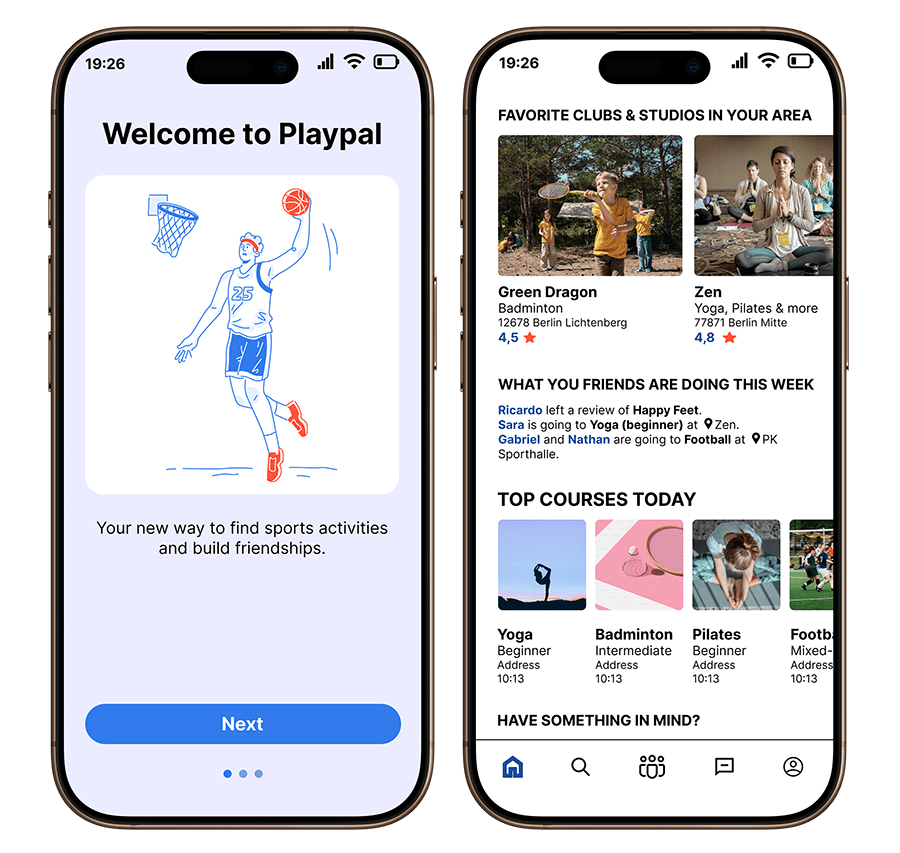
Problem statement: Many people find it difficult to discover and join local sports activities that suit their skill level, interests, and social preferences. Existing platforms like social media groups or fitness apps often lack structure and don’t provide key details about events or participants, making it hard for users to know who they will meet or how comfortable the environment will be. This uncertainty creates frustration, social anxiety, and can reduce motivation, especially for those who prefer structured activities or are cautious about meeting new people.
Possible solution:
An app that lets users explore local sports activities and connect with like-minded individuals. The app provides filtering options based on sport type, skill level, event style, and other preferences, offering structured event listings, detailed participant profiles, and tools for organizing or joining activities. This ensures users feel confident, comfortable, and motivated to engage in sports while building social connections in a supportive environment.
Project overview
My role: UI/ UX Researcher & Designer
Duration: 6 weeks
Tools: Figma
DISCOVER
I interviewed 6 potential users to understand their needs of finding the sport activities suitable for them and staying connected with their sport partners. The questions are created to
• Understanding current behavior and pain points
• Exploring comfort levels and preferences
• Identifying specific needs
• Motivation and social connection
• Discovering gaps in existing solutions
Below are some example of questions:
How do you typically find people to play sports or work out with?
What challenges do you face when trying to find others to play sports or stay active?
Have you ever used an app or social platform to find sports partners? What worked and what didn’t?
How do you feel about meeting new people for sports? Is there anything that makes you uncomfortable?
Are there any features that would make you feel more comfortable meeting new people for sports?
Do you prefer structured environments or more casual, spontaneous meetups? Why?
Why do you like playing sports or staying active with others? Is it for fitness, fun, socializing, or something else?
What motivates you to join a sports activity or meet up with a group? What would make you more likely to join?
How important is it to find people with similar skill levels or goals when engaging in sports?
Key insights derived from the interview:
Users want a centralized platform to explore a wide variety of sports activities in their local area without relying on disorganized social media groups.
Structured, clear event listings are essential for helping users feel confident and prepared when attending events, reducing the unpredictability of who will attend and what to expect.
Participant transparency around skill level and social preferences helps users feel more comfortable and confident, especially in new social settings.
The app should support building social connections through sports, encouraging participants to add friends and stay in touch after events.
Tailored event suggestions based on skill level, preferences, and location are key to ensuring users find activities that meet their needs.
Location-based matching makes it easier for users to find nearby events and spontaneous meetups, ensuring convenience and engagement.
Competive analysis
Based on user interviews regarding Strava, Facebook Events, and Urban Sports Club (USC), I conducted a competitive analysis to highlight how PlayPal addresses key gaps in exploring local sports, event personalization, and social connection.

User persona
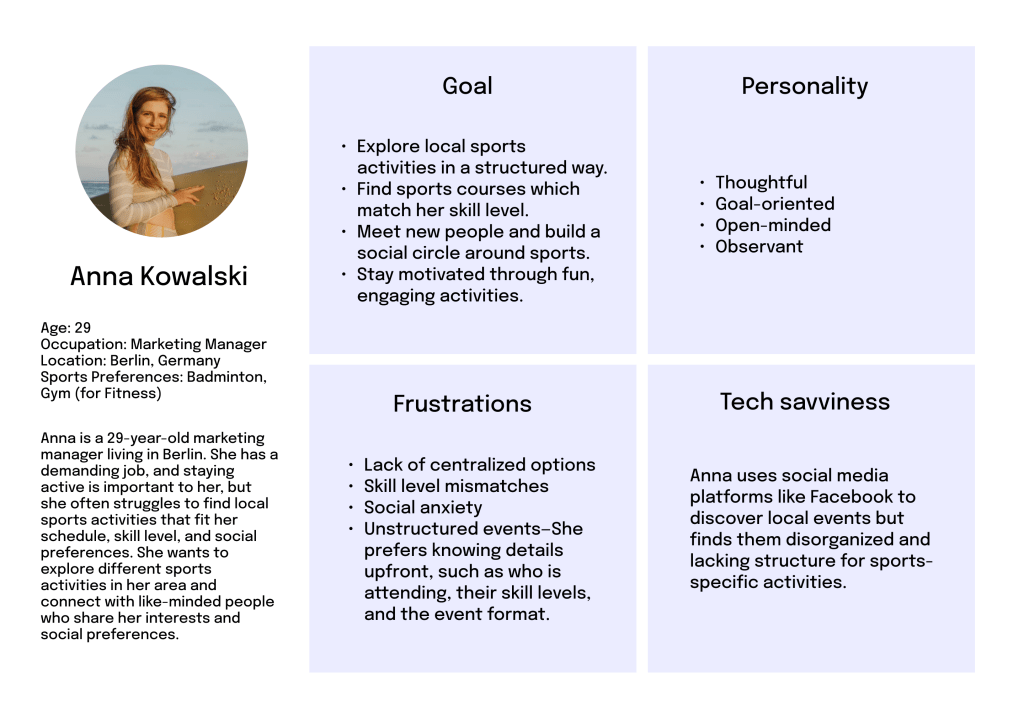
I created the user persona Anna Kowalski based on insights gathered from the people I interviewed. Their feedback helped me understand their habits, challenges, and what they’re looking for in a sports app.
Empathy map
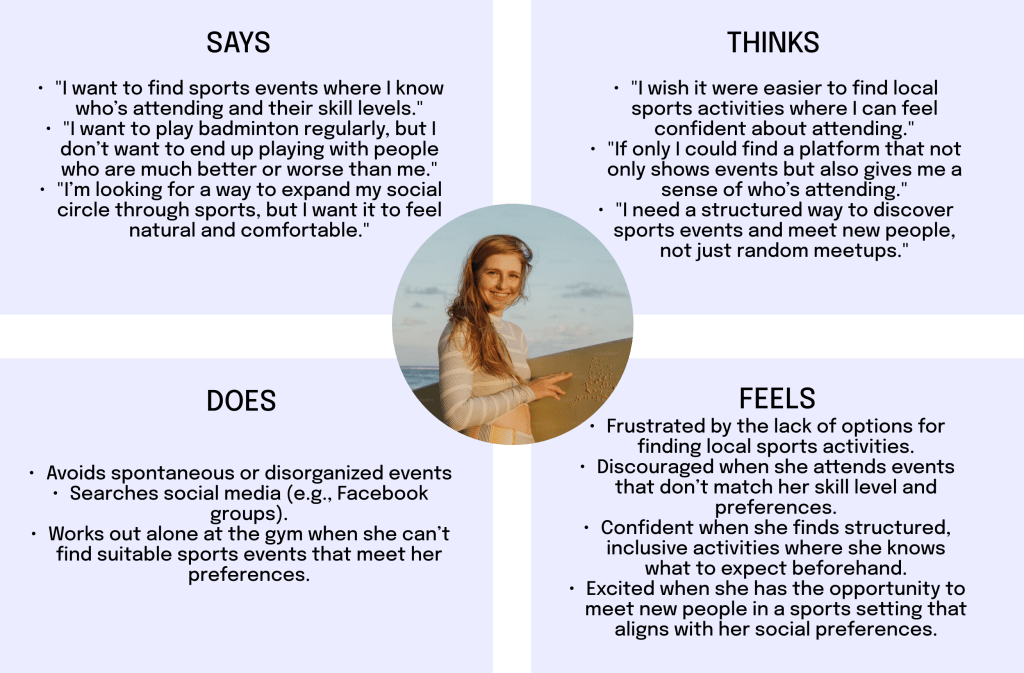
The empathy map for Anna Kowalski provides insights into her thoughts, feelings, and behaviors as she navigates the world of sports and social activities.
User journey map
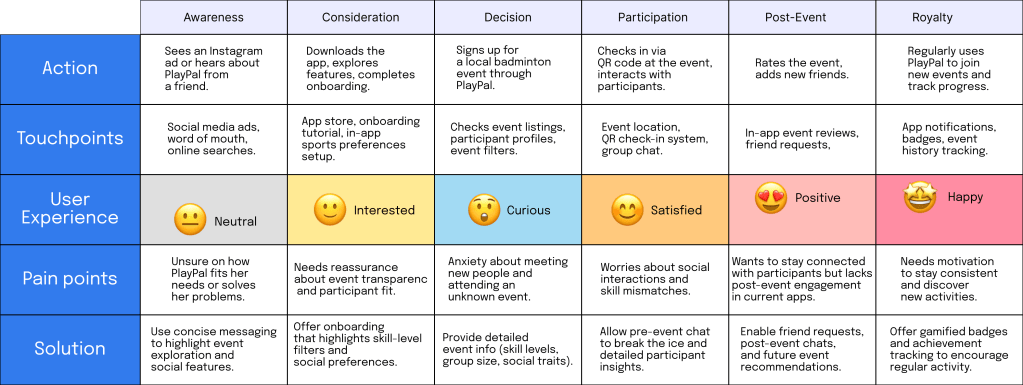
The user journey highlights Anna’s path from discovering PlayPal to becoming a loyal user while addressing her key pain points and solutions.
IDEATE
Goal: Anna wants to find structured sports events with participants at her skill level, who share her social preferences (queer-friendly, gender balance), while minimizing social anxiety and building new connections through sports.
To ensure PlayPal effectively addresses the hypotheses and pain points revealed in the interviews, I designed key features such as centralized event discovery, skill-level and social filtering, post-event social connections, gamification, and location-based suggestions. The app’s main functions include a Homepage with suggestions tailored to user’s location, a Search page with filter options, a Friends feed, and a Messaging system. These features tackle users’ primary challenges, allowing them to confidently explore local sports activities, connect with like-minded individuals, and stay motivated over time.
User flow
I then created the user flow by breaking down the app’s main categories and incorporating the onboarding process.

Wireframing process
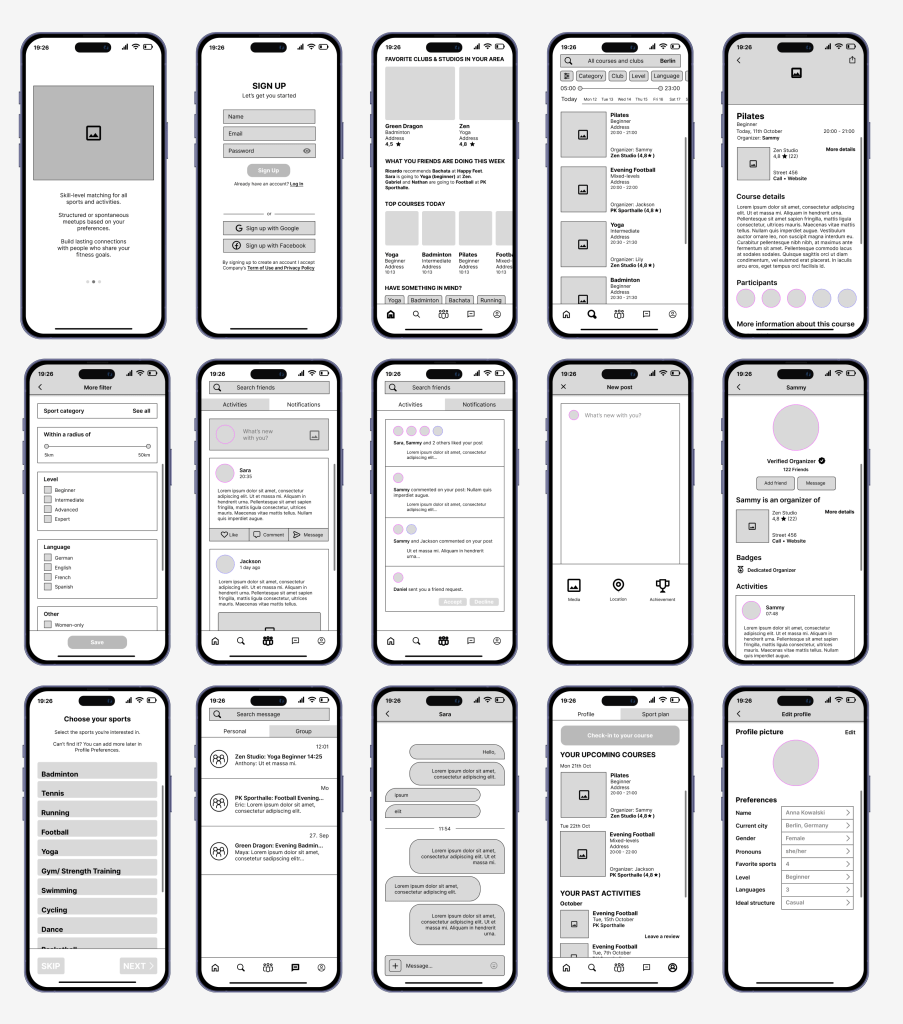
After identifying the key functions of the app, I began brainstorming and creating simple wireframes. This phase involved multiple iterations and revisions before finalizing the design for the Lo-fi prototypes.

DESIGN
Lo-fi Prototype
Basic outline of the app’s core functionality and ensure a smooth user flow.
Hi-fi prototype
The Hi-fi prototype displayed here is the final result, refined and adjusted based on user testing to ensure a smooth and seamless user experience.
The color palette features blue and coral red. Blue is an ideal choice for a sports and social media app as it conveys trust, reliability, and a sense of calm, which helps create a welcoming and engaging environment for users. Coral red adds energy and vibrancy, enhancing the app’s dynamic feel.

The font used is Inter, ensuring readability and simplicity throughout the interface.
Illustration pack from @illiyinstudio
Onboarding Process
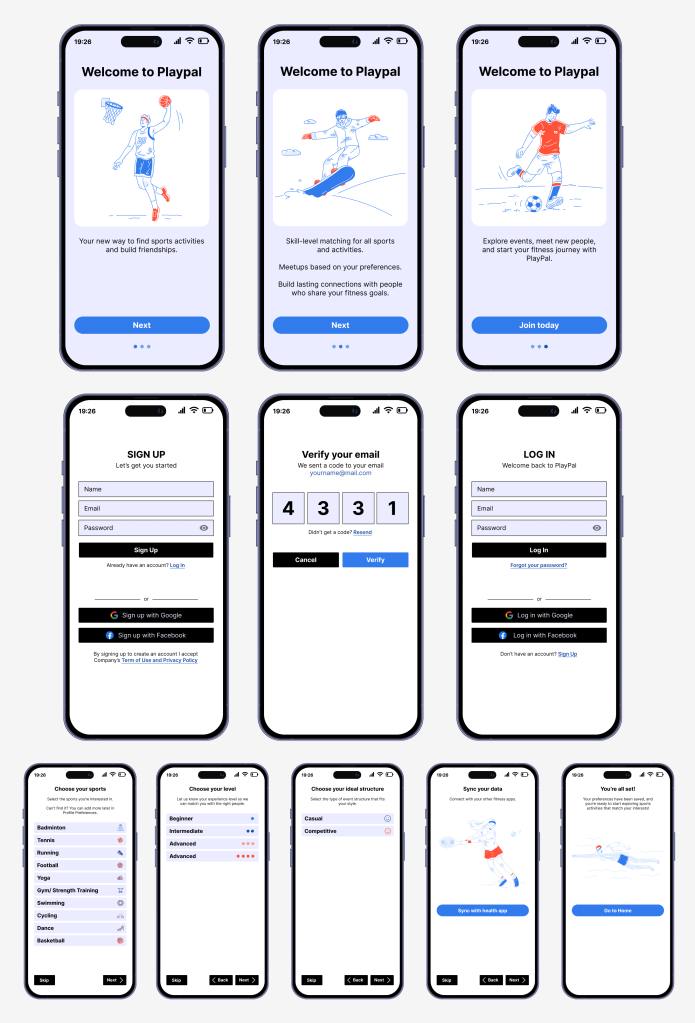
The onboarding process includes signing up, verifying the account via a confirmation code, and logging in. Users then set up their onboarding preferences, enabling the Homescreen to recommend relevant sports events. Preferences can be updated later through the Edit Profile option in the Profile section.
Homepage & Search page
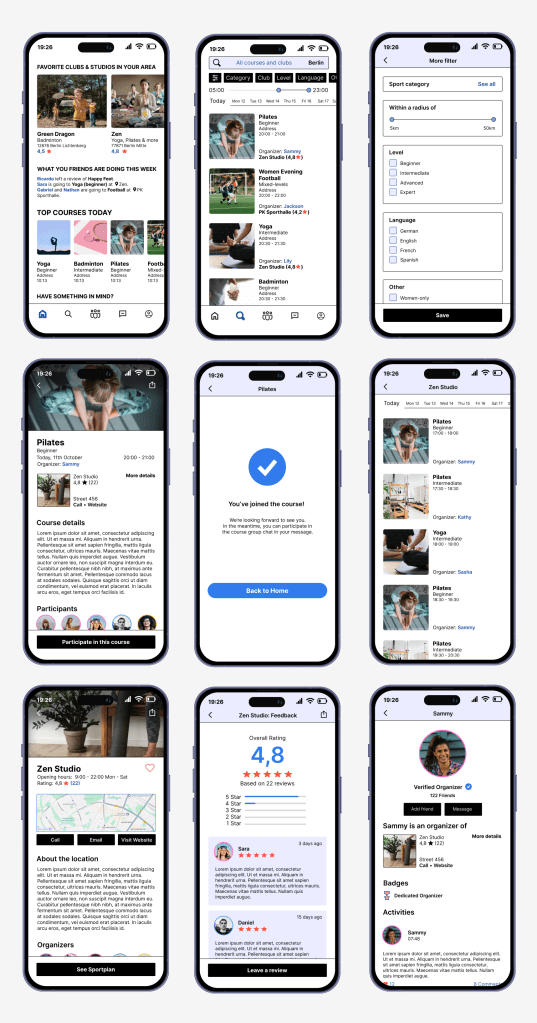
The Homepage displays suggested clubs, studios, and events happening throughout the day. Users can also see which events their friends are attending during the week. By selecting a suggested sport, users can explore available courses and activities.
The Search Page allows users to view sports activities scheduled for today or upcoming days. Users can adjust filter settings to find courses that match their preferences. They can explore event details, check out the studio or organizer, and register for courses directly.
Friends Page
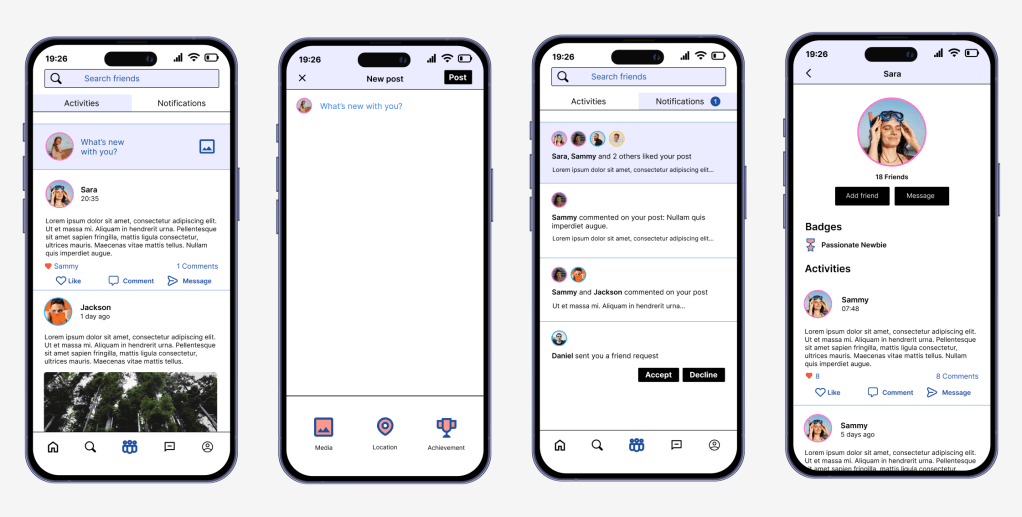
On the Friends Page, users can share content, view their friends’ activities, and switch between the Feed and the Notifications tab, which tracks notifications and friend requests. This helps users stay connected and engaged with their social network.
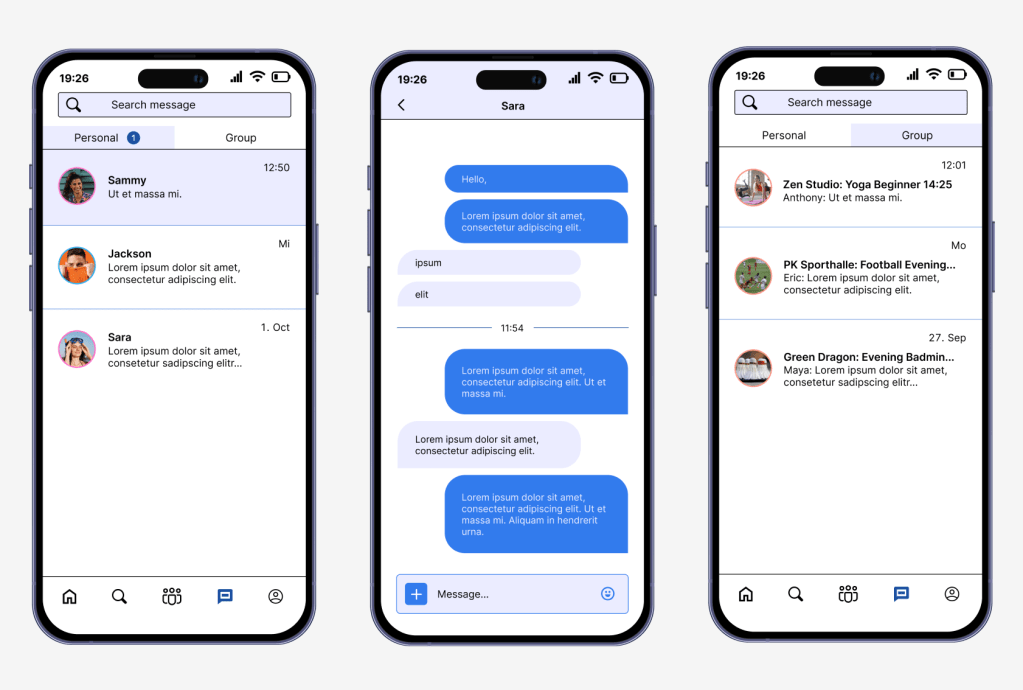
Messaging
The Messaging feature enables users to send personal 1-on-1 messages or join group chats for the courses they are participating in. This fosters pre-event communication and coordination among participants.
Profile Page
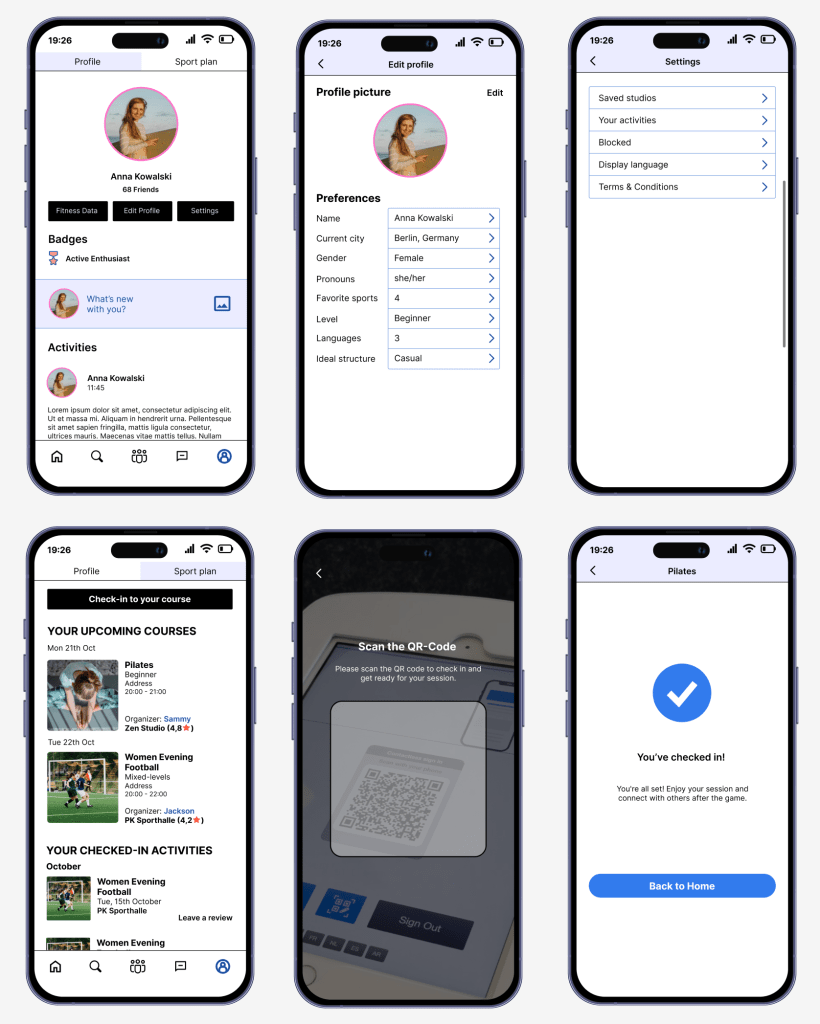
The Profile section provides several key functions:
- Sync Fitness Data: Integrate data from other fitness apps.
- Edit Profile: Update personal details and preferences.
- Settings: Access and manage app settings.
- Post Activities: Share completed activities and view past posts.
- Sportplan Tab: Track upcoming courses and review past events. Users can also check in to events directly from this tab.
- Event Reviews: After successfully checking in to an event, users can leave a review to provide feedback on their experience.
User Testing
Following the completion of the first Hi-fi version, I conducted a user test with 5 participants. The test included the following tasks:
- Signing up and completing the onboarding process
- Participating in a course and checking in
- Chatting with a friend
All users reported a seamless experience, indicating that the app’s flow is intuitive and effective. I’m very satisfied with the results of this testing phase.
Final Thoughts
Although PlayPal is an imaginative case study, I thoroughly enjoyed working on this project. I believe it has the potential to evolve into a real startup someday. In the meantime, I’m excited to apply the skills and insights gained from this experience to bring other apps to life in the future.
 Linh Duong