Kidzy is a smart, user-friendly app designed to help parents discover, plan, and book kid-friendly activities tailored to their family’s needs. With advanced filters for age, cost, and location, real-time weather updates, and detailed event information, Kidzy centralizes everything in one place. Parents can explore playgrounds or activities, book and pay for events directly through the app. Say goodbye to the stress of searching across multiple platforms—Kidzy simplifies planning, ensuring quality family time and memorable experiences for both kids and parents.
(click here to go to the app prototype)
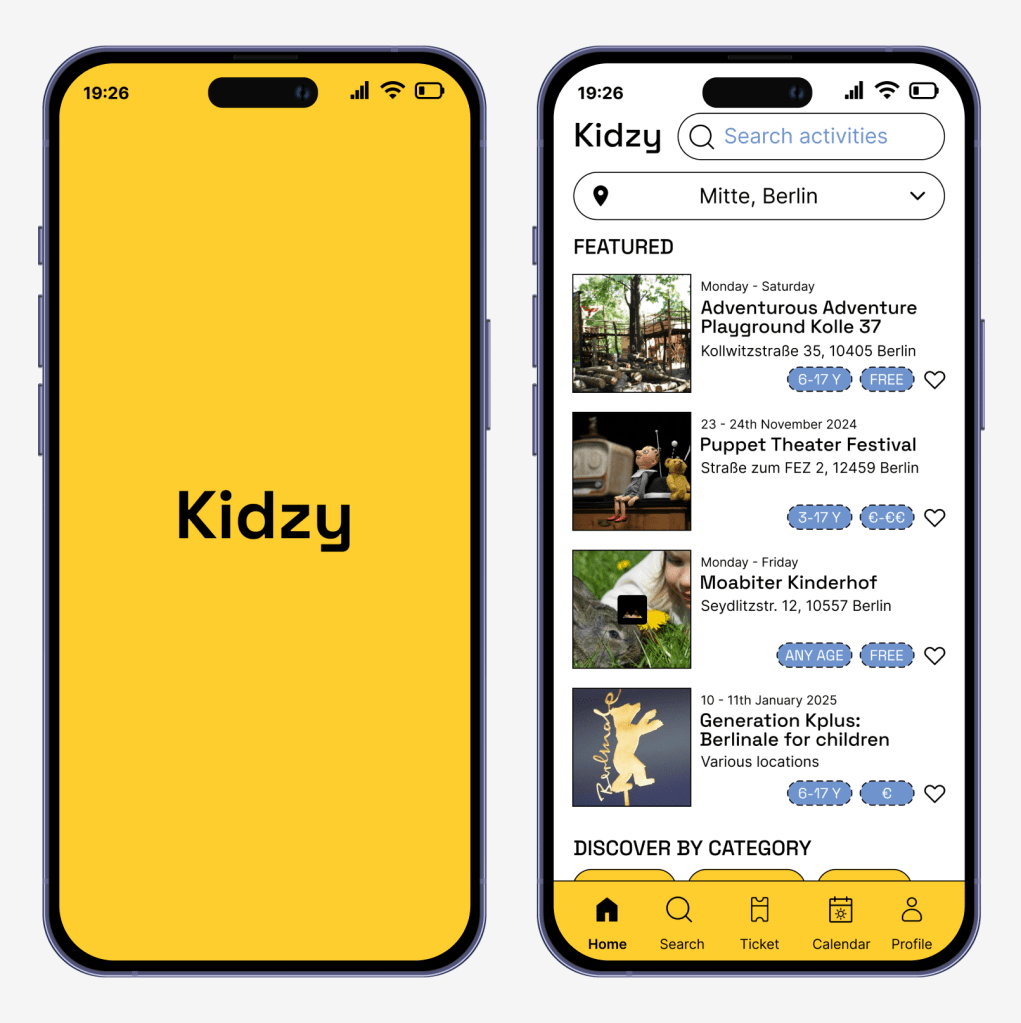
Problem statement: Parents constantly seek engaging, age-appropriate activities and safe places for their children to play, whether free or paid. However, finding these options is often time-consuming and fragmented across multiple sources, such as social media, community boards, and search engines. Additionally, the lack of centralized information on event details, accessibility, and real-time conditions like weather makes planning even more challenging, leaving parents frustrated and unsure about where to take their kids.
Possible solution:
An app that serves as a one-stop platform that simplifies the process of discovering, planning, and attending kid-friendly activities. It will address key user pain points by offering the following features: comprehensive event search with advanced filters, integrated ticket booking and calendar management, user reviews and ratings, weather-responsive event suggestions.
Project overview
My role: UI/ UX Researcher & Designer
Duration: 6 weeks
Tools: Figma
DISCOVER
Qualitative research
Kidzy’s interviewers are consist of 5 individuals with different life styles. The questions are used to understand their behaviors, their problem and pain points, understand their current solution, and explore ideas for new solutions.
Below are some example of questions:
How do you usually find activities to do with your kids?
What are the biggest challenges you face when planning activities for your children?
How do you usually determine if an activity is suitable for your child (age, interests, etc.)?
Have you ever taken your child to an activity that didn’t meet your expectations? What went wrong?
What websites or apps do you use (if any) to find kid-friendly activities? What do you like or dislike about them?
What information do you wish you had before deciding on an activity?
Do you typically prefer free activities, or are you willing to pay for them? How important is cost when selecting activities?
How far are you usually willing to travel for an activity?
Would you find it useful to see other parents’ reviews of activities?
How often do you plan activities in advance versus spontaneously?
How do you currently keep track of all your children’s activities and schedules?
Key insights derived from the qualitative research:
Parents rely on multiple sources (Google, social media, community boards) to find activities, which is time-consuming and often disorganized.
Age-appropriateness and safety are critical; parents prefer activities tailored to their child’s developmental stage and crowd size.
Weather dependency significantly impacts planning, with a preference for indoor activities during bad weather.
Spontaneity vs. planning: Some parents plan weeks in advance, while others prefer last-minute options, highlighting the need for flexibility in activity discovery.
Cost considerations vary, with a strong preference for free or low-cost outdoor events but willingness to pay for engaging indoor activities.
Detailed event information (e.g., accessibility, parking, proximity to amenities) is often missing, making it harder to plan effectively.
Cultural events and traditions are highly valued, especially by immigrant families looking to connect their children with their heritage.
Reviews are valuable for setting expectations, but some parents prioritize firsthand experiences over others’ opinions.
Booking integration and event reminders simplify planning and reduce the risk of missing out on activities.
Quantitative research
Kidzy’s survey was participated by 20 individuals with multiple choice questions about the frequency, preferences, challenges, and priorities of parents when planning activities for their children.
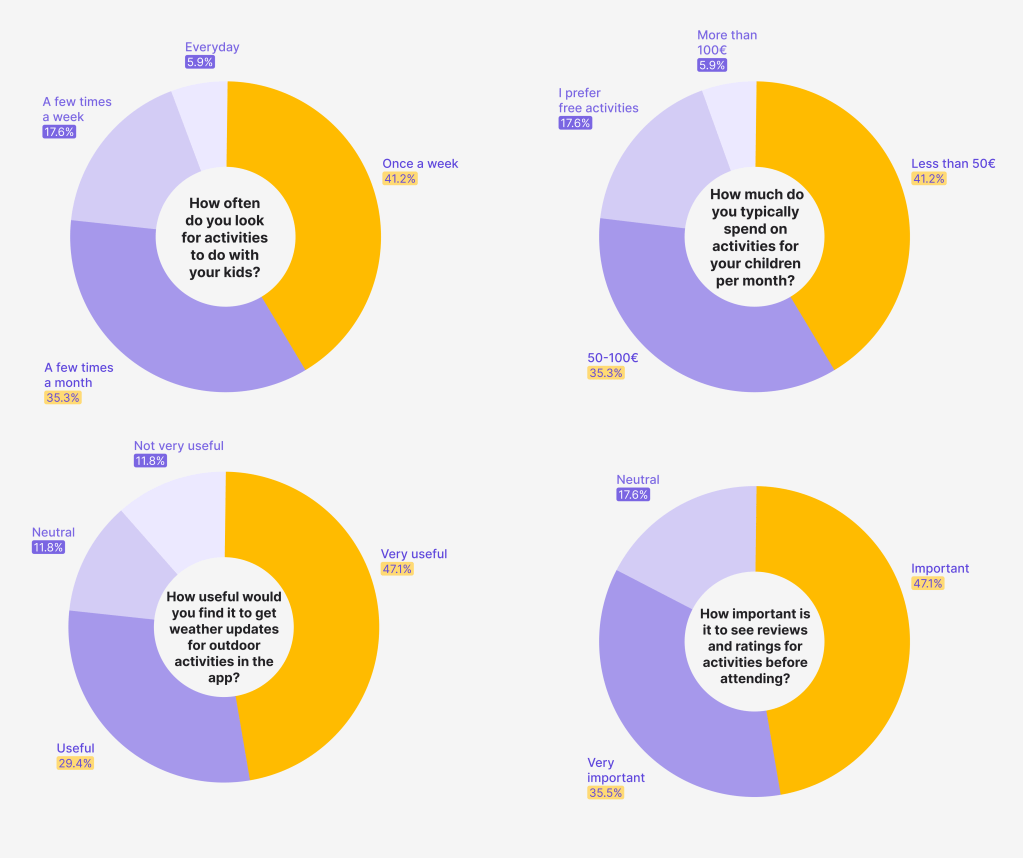
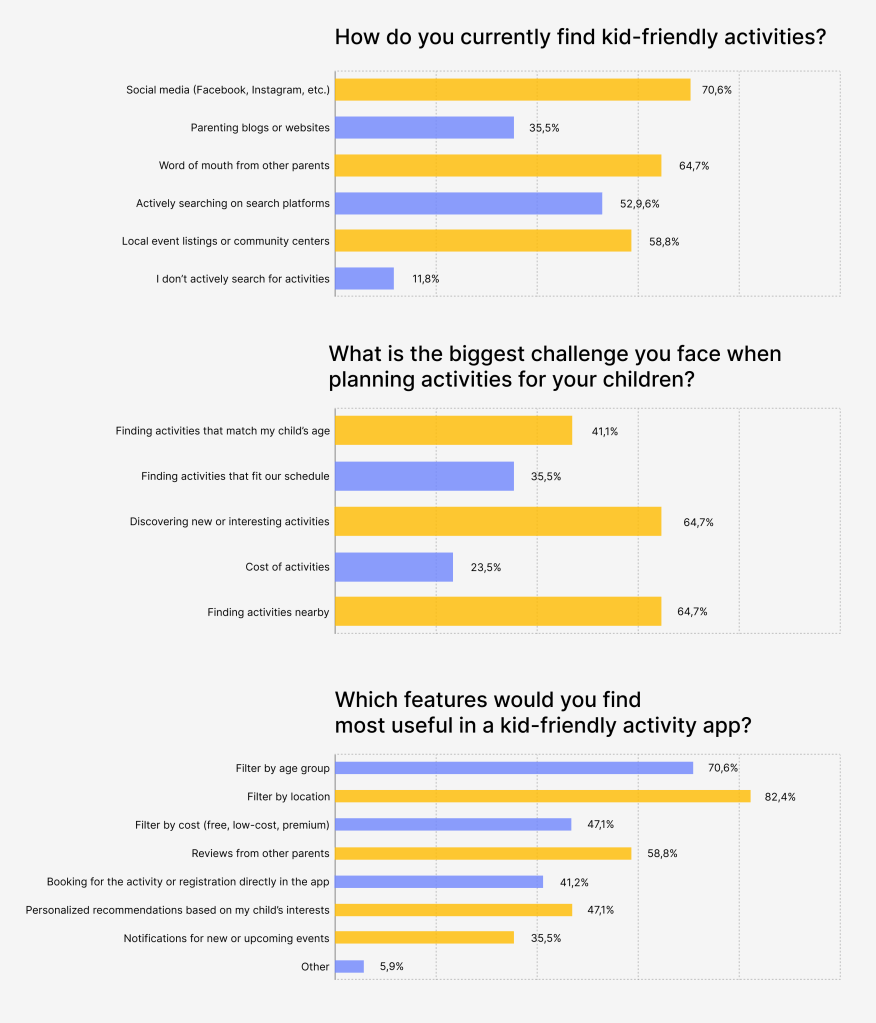
Based on the surveys, we find out that parents have high demand for activity discovery but only fragmented search methods available, location and convenience are key, also importance of filters and low-cost activities are favored. Furthermore, parents would like to track the weather and have reviews and ratings to consider.
Both research methods validate the need for Kidzy as a user-friendly app that addresses parents’ pain points: the need for centralized and simplified event discovery with advanced filtering options and comprehensive event information, integrated planning tools like in-app booking and payment, calendar integration, and event reminders, weather and reviews from other parents.
Competive analysis
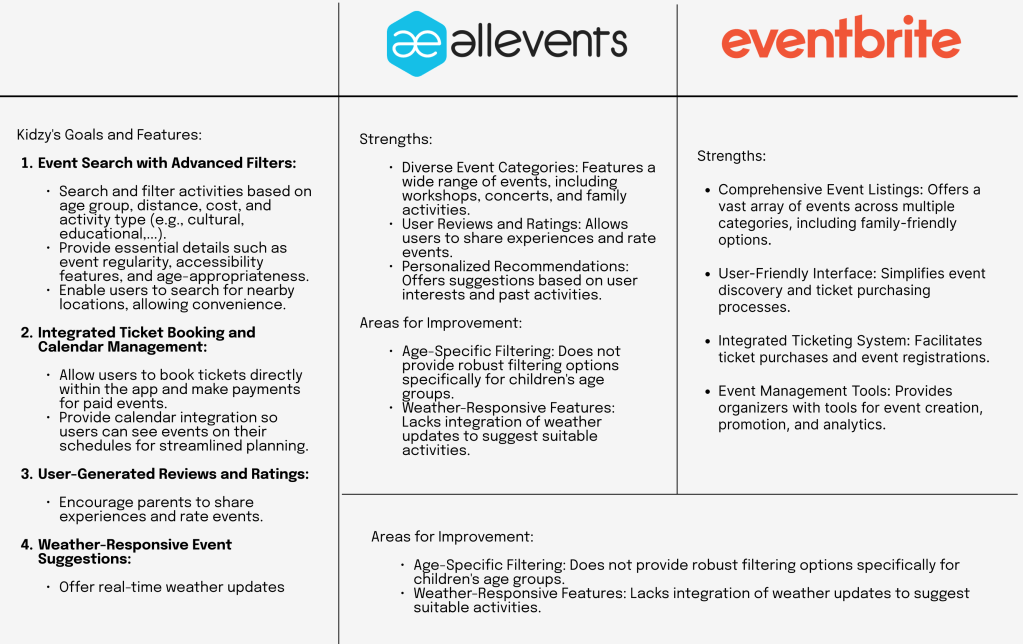
Kidzy doesn’t have direct competition, but apps like Eventbrite and AllEvents offer similar functionalities, allowing users to discover free or paid events, book tickets, and manage their bookings. To better understand how Kidzy compares and stands out, I conducted a competitive analysis of these platforms.
User persona
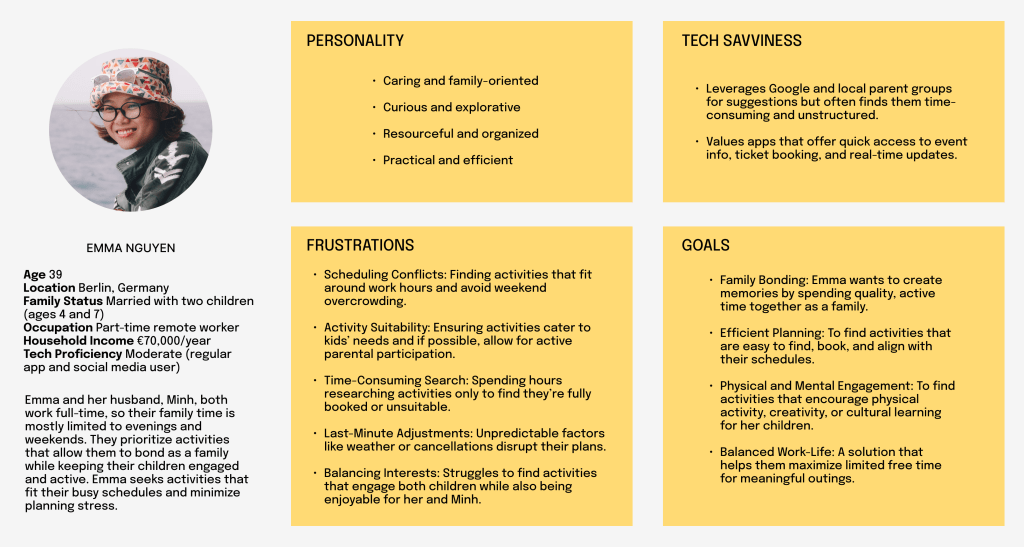
I created the user persona Emma Nguyen based on insights gathered from the qualitative and quantitative research.
Empathy map
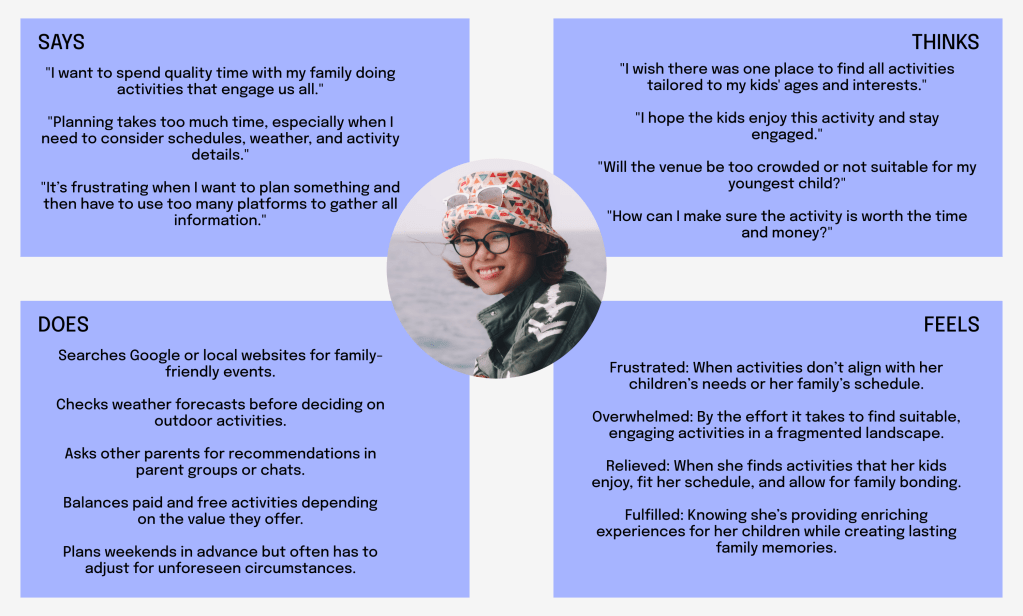
Based from the persona Emma Nguyen, the empathy map for her captures her needs, thoughts, and emotions as a busy working mom planning activities for her family, the map serves to understand Emma’s perspective and guide Kidzy’s development to address her challenges effectively.
User journey
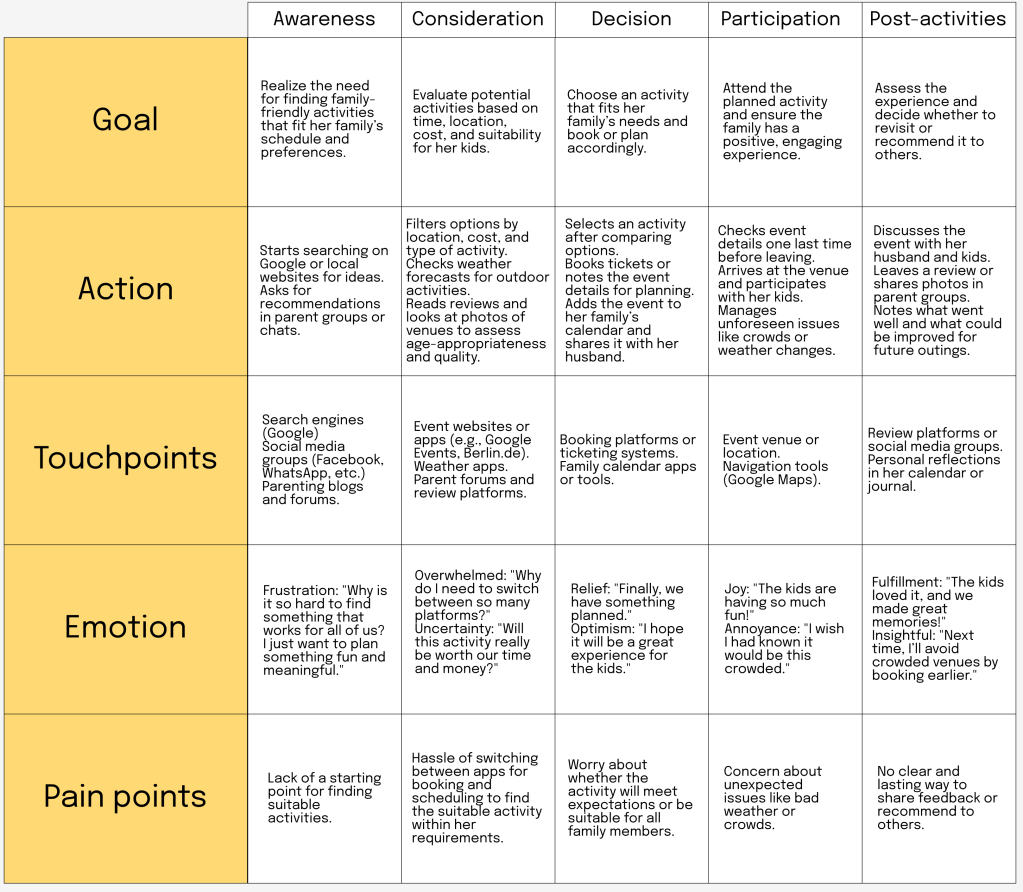
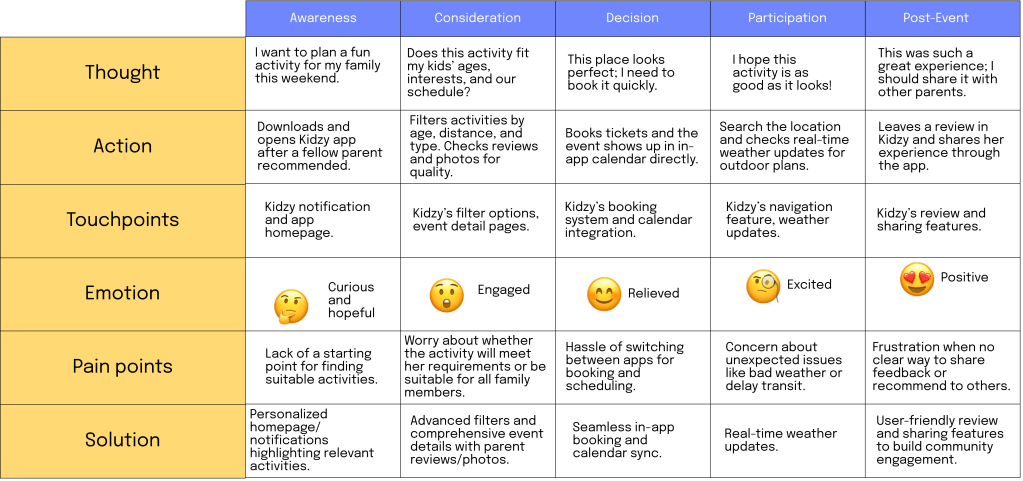
The user journey was crafted based on insights gathered from qualitative and quantitative research with parents, and from user persona and empathy map. By analyzing their pain points, motivations, and behavior patterns. Her journey demonstrates how Kidzy can solve her issues.
IDEATE
User flow
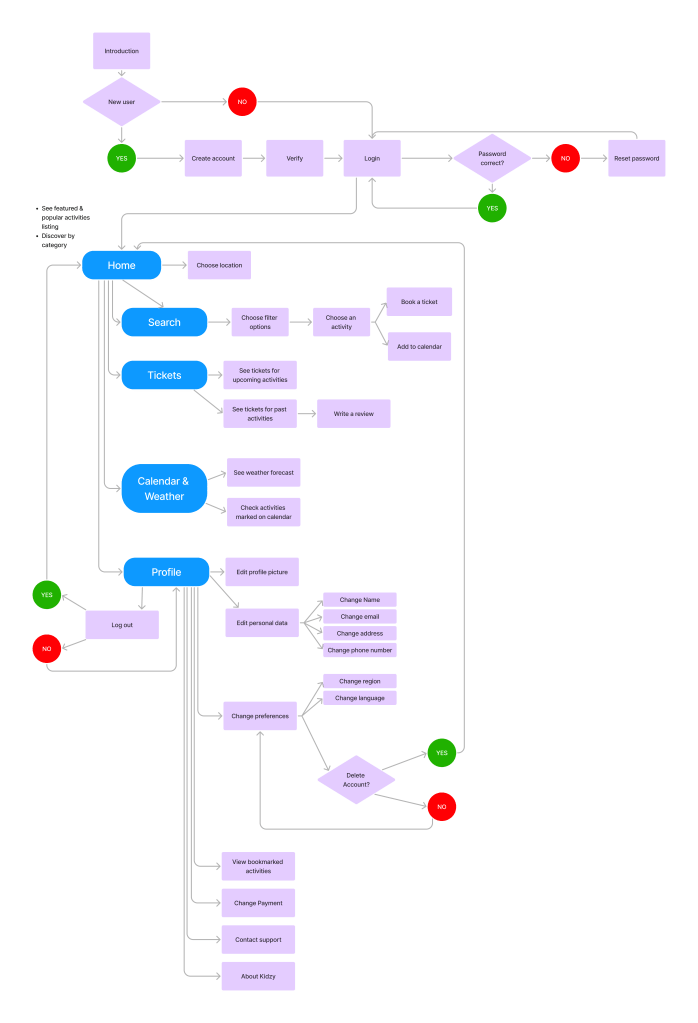
Following the result from the Discover phase, I concluded that Kidzy should be a centralized Platform combining search, reviews, booking, and weather insights in one app to reduce fragmentation. Kidzy should also have advanced filters to help Emma find activities tailored to her family’s needs (age, distance, cost, cultural relevance), real-time weather updates, seamless integration that provide booking, calendar syncing, and reminders to simplify the planning process.
I created the user flow by breaking down the app’s main categories and incorporating the onboarding process.
Wireframes
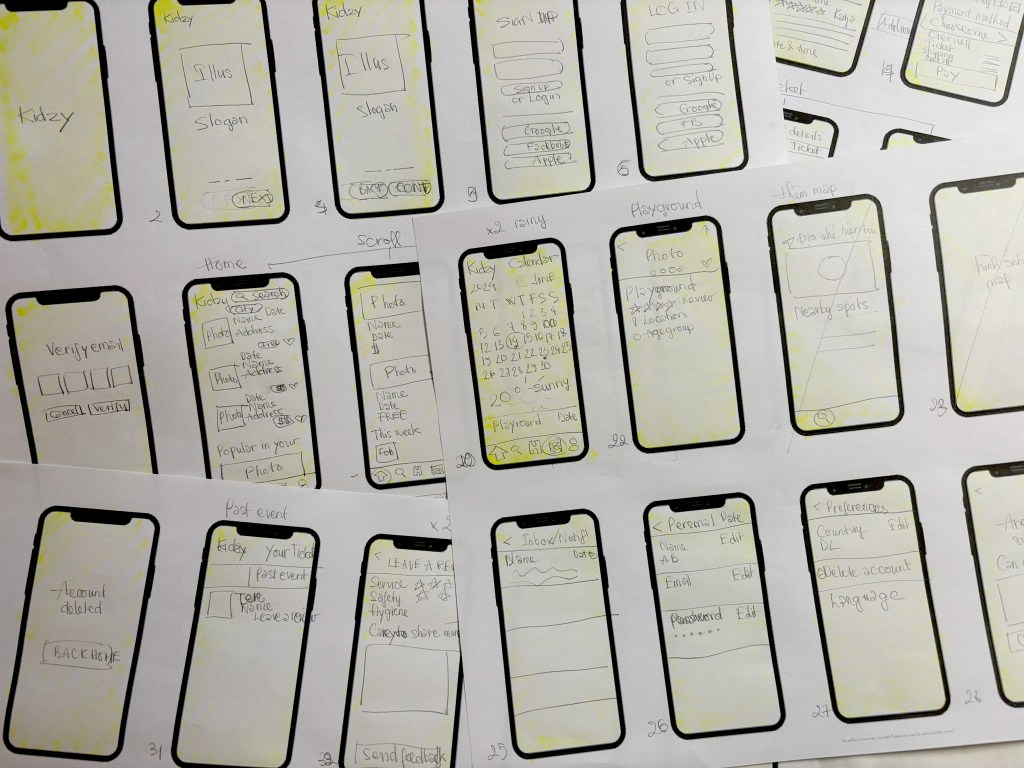
After finalizing the app’s structure, I started creating simple wireframes to visualize its functionality and user interface. Building on the experience I gained from my Playpal project, my skills have significantly improved, allowing me to complete this phase much more efficiently.
DESIGN
Lo-fi prototype
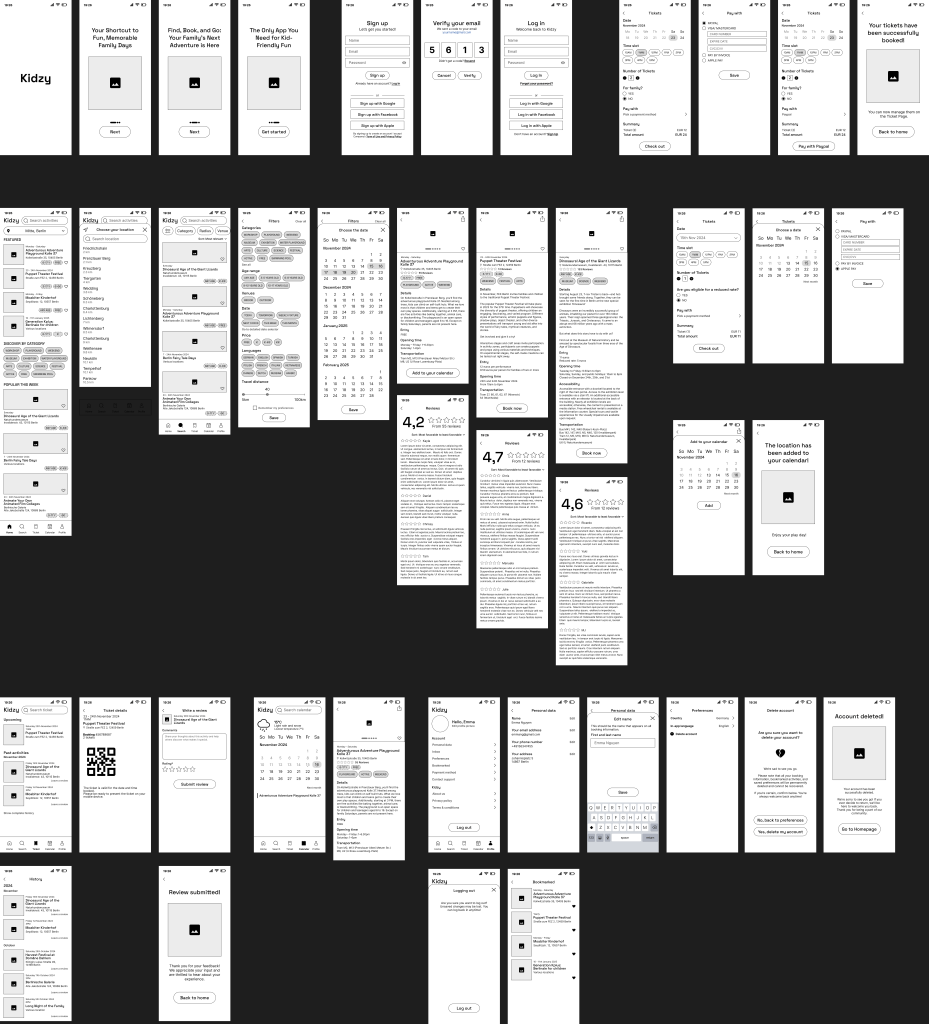
After completing the wireframes, developing Kidzy into a low-fidelity prototype was a fun and engaging process. The app features an intuitive onboarding flow, followed by registration, and a toolbar that links to five main sections: homepage, search, tickets, calendar and weather, and personal profile.
Hi-fi prototype
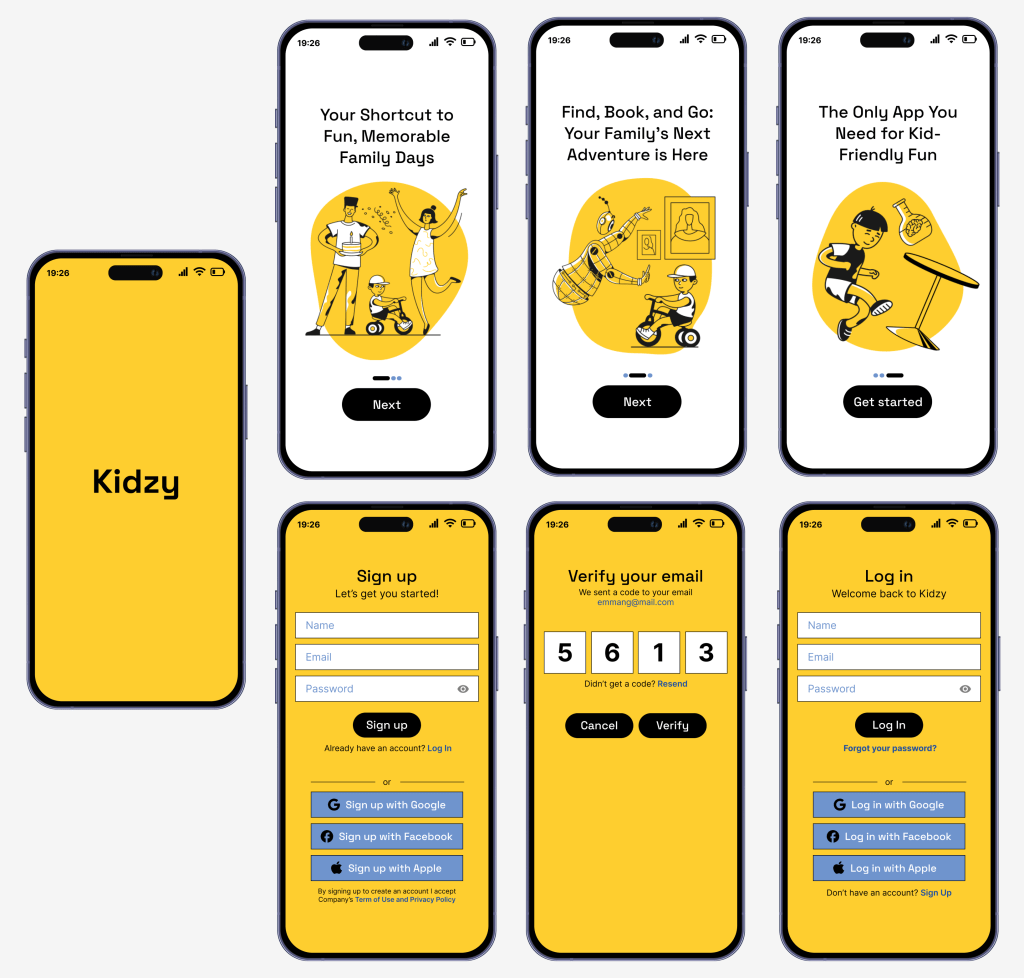
The hi-fi prototype for Kidzy featured 46 screens, designed with a cheerful yellow and light blue color scheme to evoke the essence of childhood summer.
Illustrations are from Icons8
The onboarding process included three app introduction screens, followed by a straightforward registration process.
HOMEPAGE & SEARCH PAGE
The homepage showcases featured and popular events, allowing users to change their current location and explore events from popular categories.
The search page suggests nearby events and includes a filter function, enabling users to refine their search based on their preferred activities.

ACTIVITY INFORMATION
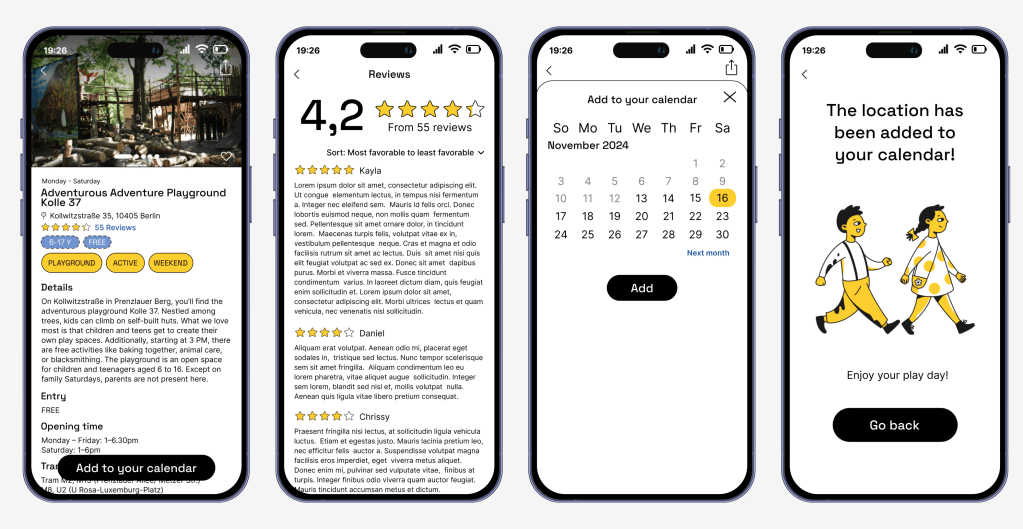
The activity details page provides information about the activity, including reviews, event description, opening times, pricing, and nearby public transportation options.
For free events, users can add them directly to their calendar. For paid events, users can conveniently book tickets and make payments within the app.
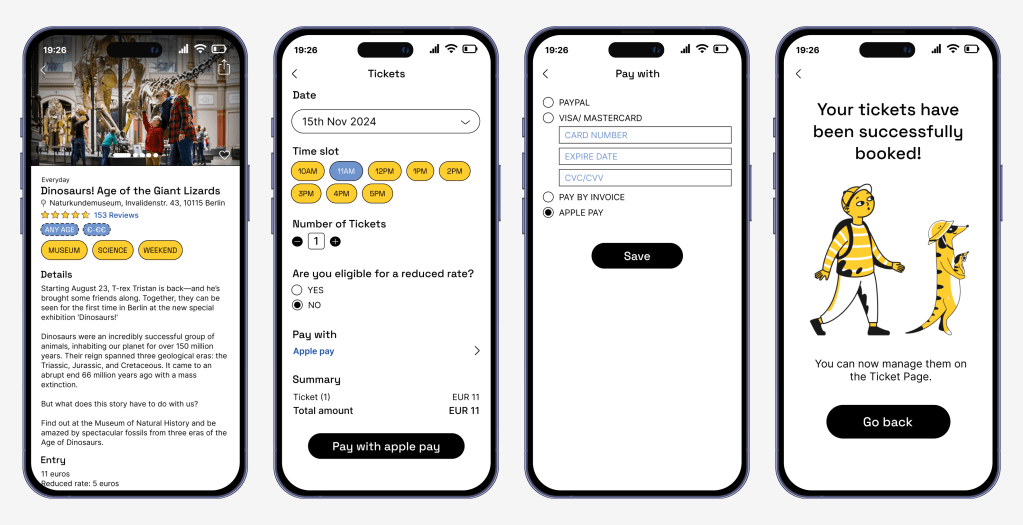
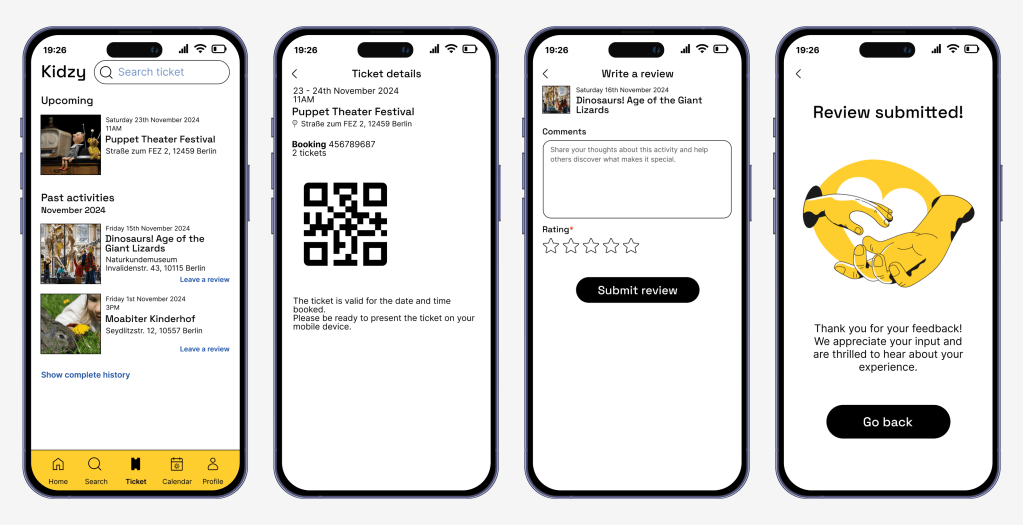
TICKET, WEATHER, CALENDAR & PROFILE
The ticket page allows users to view their booked tickets, access past tickets, and submit reviews.
With the integrated weather and calendar features, users can check real-time weather updates and manage all their saved activities in one place.
The profile page enables users to update their personal information and preferences while also providing access to Kidzy’s details and resources.

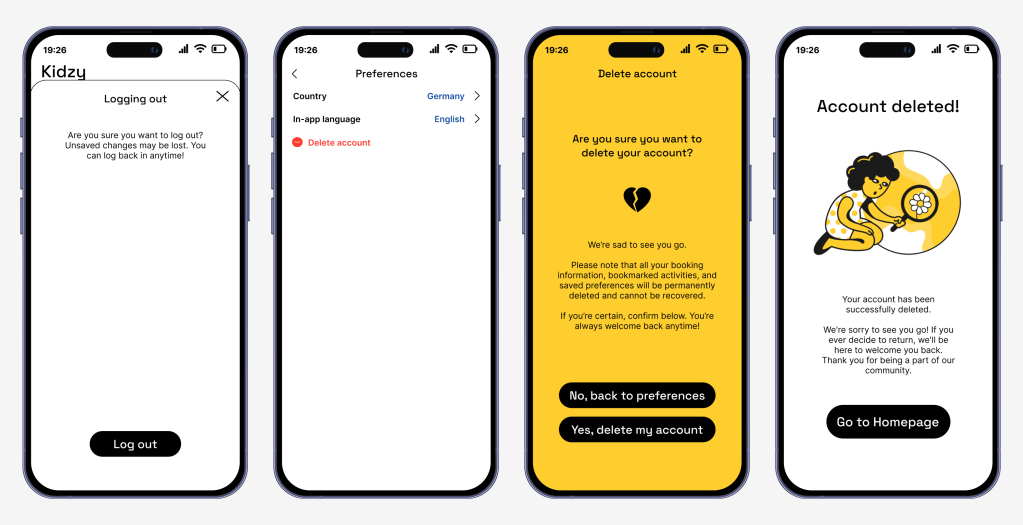
On the profile page, users can log out. In the preferences section, they have the option to delete their account.
TESTING AND IMPLEMENTING FEEDBACK
In the hi-fi prototype test, 3 users were asked to:
• Log in
• Change location & apply filters
• Book a ticket
• Check calendar & weather
• Leave a review
I observed them as they navigated the app, making adjustments to improve the flow based on their feedback. Users found the app easy to navigate, and all were able to complete the tasks successfully.
Using the insights from the user test, I crafted the user journey for the Emma Nguyen persona, mapping her experience with Kidzy.
With Kidzy, I was able to work more efficiently and quickly, as I was already familiar with the process. This familiarity allowed me to create a more polished and visually appealing UI in less time. The more I immersed myself in solving design challenges, the more passionate I became, and I hope this enthusiasm continues to drive my work moving forward.
 Linh Duong